

Solution Overview

A SafeConsoleReady secure USB drive uses a password and hardware encryption to protect all stored information automatically. This technology ensures that your sensitive data is always kept private and that data breaches are avoided altogether. But it takes more than just a secure USB drive to ensure that your data is safe.
SafeConsole is the only secure USB management platform for secure USB drives that has true password management (remote and local) and that integrates fully with LDAP (for on-premise installation). Also available as a service in the cloud.
Rated 5 stars by SC Magazine.
Check out what is new in the latest release
Request a technical call to investigate your requirements. Email [email protected]
Resources
The resource section includes everything you need to make an informed decision on managing secure USB drives.
Datasheet, Technical Manual and Purchase information
- SafeConsole Datasheet [PDF]
- BlockMaster SafeConsole Server Manual [Downloads page - see BlockMaster Server Manual -PDF] The manual is a extensive document and covers everything technical.
- SafeConsole Pricing and Feature Comparison [PDF] Here you find answers to most buy questions.
Guides, Best Practices and Reports
- 7 Steps to Securing USB [PDF] A quick overview of the secure USB solution and best practices,
- Secure USB Password Management Best Practice[PDF] Security best practices for managing passwords on secure USB drives.
- Ponemon report - State of USB Security [PDF] A in-depth report on how customers view USB security. Includes a best practice recommendation.
Select Benefits

Assist forgotten passwords
Reset forgotten passwords using a secure, local self-service or a central help desk challenge-response procedure.

Automatic inventory
Get an automatic inventory directory listing all users (optionally from LDAP Active Directory) and their devices. As with all functioning inventory lists, this will limit waste of devices and assist you when assigning previously used devices to new users.

Full Audit for Compliance
Enforce accountability and assist compliance efforts by activating a full audit trail on all device actions and file changes.

Enforce policies
Enforce your security policy. By ensuring that stored data is protected with a password that meets your safety standards. Limit or eliminate the risk of USB devices introducing malware onto your networks and much more.

Get users back to work
Re-create data from a lost device onto a new, off-the-shelf device by centrally pushing the existing backup package onto the new unit at the user location.

Remote kill
Centrally handle the state of the devices over the Internet, setting them as disabled or lost- even perform factory resets remotely. Disable a user in AD and their devices are automatically disabled.
Easy and Rapid Deployment
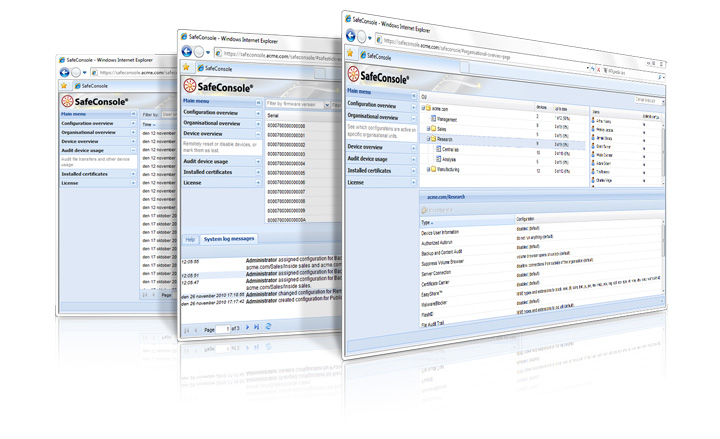
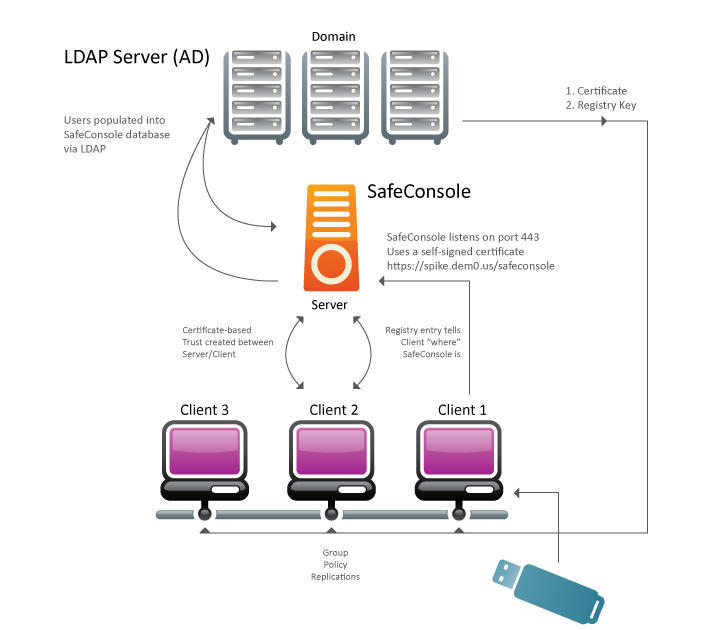
SafeConsole offers an easy and efficient roll-out scheme for both small and the largest organizations optionally connected to LDAP (AD). Administrators can authenticate to access SafeConsole with their AD credentials. Start with installing SafeConsole on your server and go on to deploying drives to users, and you will gain full management control from day one. Each unique device is registered to a specific user in SafeConsole and linked to the user in the corporate directory (if available). The all-in-one installation has the power to serve large device deployments in the thousands if required.
DeviceDiscovery Free Tool - Included with the SafeConsole Trial
Track the usage of all USB connected removable storage media within your organization with the free command line tool DeviceDiscovery. DeviceDiscovery searches through and generates a report containing all devices used within the entire domain, when they were last used and to which computers they have been connected.
Features by Category

Remote Password Reset
 Reset passwords remotely over any channel. Administrators can get remote offline users back to work within minutes, without any loss of stored data. The short 8-character recovery codes are easily read over the phone yet maintaining the robust security of a 128-character code using a pre-buffer method. No data is lost and the process is protected against social engineering directed against the helpdesk. The user password is never exposed and there is NO master password. Read the Password Management Best Practice Paper.
Password Policy
 Ensure that all data is protected by strong, compliant passwords by enforcing password policies on the devices
Secure Self-Service Password Reset and Unlock with ZoneBuilder
 With ZoneBuilder enabled, a user can reset a forgotten password on a trusted user account. This radically lowers support costs while still remaining as secure as the user account. The ZoneBuilder uses a unique certificate to unlock the drive on the trusted user account. The certificate can be stored on the trusted user account or on a smartcard device.

Device Auditing - See Who Did What, When and Where
 Device auditing makes taking stock of the entire portfolio of SafeConsoleReady devices easy as it creates an automatic inventory list. The logs then include unsuccessful unlocking attempts, device states and log-ins. This gives the administrator a full overview of all drives in use in the organization.
File Audit Trail - Achieve Compliance Requirements
File Audit Trail is an extension of the Device Audit. It allows an administrator to see what files have been copied to or deleted from the devices, as well as a trail of the files that have had their names changed.
Device State Management - Full Control Over Devices
 As an extra security precaution when drives are lost, or to protect your organization’s sensitive information from access by former employees, you can remotely ‘kill’ rogue drives and erase them of all data. In the Device Overview in SafeConsole, an authorized administrator can set the device state to ‘killed’, ‘disabled’ and ‘lost’. Devices can later be recovered using the Remote Password Reset and/or Backup features. SafeConsole can also be set to handle the devices’ states entirely on autopilot. This will require the drives to return to base by connecting to the SafeConsole server within a configurable time period.
ZoneRestrictor – Patent Pending
Limit usage of select USB drives to designated machines or to requiring the presence of a smartcard certificate. Great for restricted internal use of drives, secure labs and high-security networks. Drives cannot unlock outside the zone.
Content Audit - Full Content Traces
 An administrator can recreate the current content of a device for auditing purposes. Data tracing puts a powerful tool in the hands of the administrator that can play a crucial role in resolving a multitude of situations such as crisis management.

Inactivity Lock - Forgotten Drives Lock Down
 Preset (and override the users’ own settings for) the Inactivity Lock to lock down the secure USB drive after a configurable number of minutes. If a user forgets an unlocked drive in a computer, the drive will automatically lock down in accordance with the set policy.
File Restrictor - Restrict File Types to be stored EXE, MP3
 By taking a white-list approach to preventing storage of unauthorized file-types the FileRestrictor relieves the users from protecting their device. Rogue files can simply not reside on a SafeConsoleReady Device as it only allows storage of file-types specified by the administrator in the SafeConsole settings.
Authorized Autorun - Stop Autorun Viruses
 The onboard autorun-protection that chokes self-copying viruses such as StuxNet and Conficker – by denying unauthorized autorun files from residing on the drive altogether.
Write Protection - Set Devices in Ready-Only Mode
 With Write Protection, users can set their drive in a read-only mode when unlocking it on non trusted machines and thereby gain protection from malware trying to infect the drive or its content. It is also possible for an administrator to enforce this protection when a user leaves the company network ensuring that no malware can be copied to the drives and brought back to the company.
Sophos Antivirus for SafeConsoleReady Devices
The SafeConsoleReady Sophos Antivirus is deployed onto existing SafeConsoleReady drives by the SafeConsole server administrator and offers the device end-user a quick and resource effective, on access protection against malware on and off the corporate network. This is the first enterprise mature antivirus solution made available for secure USB drives.

Smart Cloud Backup and Recovery
A lost drive or an inadvertently overwritten file would normally make you lose hours of work. In the event of a lost SafeConsoleReady device, an administrator can easily recreate the drive by sending its backup and settings to a new device. The continuous incremental backup is a transparent procedure that does not affect the users’ everyday routines or work. The recreate procedure is handled remotely and involves no end-user actions other than plugging a SafeConsoleReady drive into their machine. The versioning of the backup information makes it possible to retrieve a file that was accidentally erased or overwritten. Backup securely from any machine to a cloud secure storage server.
Secure Quick Automatic Unlock with ZoneBuilder
When your users have entered a username and password to log on to their workstations they get automatic access to their secure USB drive using a trusted certificate on the account(or their smartcard). On any other machine the user will enter the regular device password when prompted for it.
ShieldShare Integrated
Enable secure file sharing between secure USB drives and desktops. Read all about ShieldShare here

Device LockOut - Port Control
Device LockOut complements your secure USB drives by ensuring the network administrator that no other USB storage devices can access your network. Device LockOut now also allows granular policies with exceptions to also allow for instance other secure USB drives.
DeviceDiscovery - What Is Your Status?
Track the usage of all USB connected removable storage media within your organization. The free DeviceDiscovery command line tool searches through and generates a report containing all devices used within the entire domain, when they were last used and to which computers they have been connected. Request the software here
Authorized Autorun - Stop Autorun Viruses
To prevent the spreading of autorun malware a SafeConsoleReady device always overwrites the autorun.inf files stored on the encrypted storage volume, which chokes the effect of viruses such as Conficker. To still be able to have authorized applications autorun off the devices, you can specify trusted commands in SafeConsole. That way you can keep the benefits and convenience of autostarting working-tools, but disallow a gateway for malware infection.
Device User Information
 Customize the devices with user information for identification and secure lost and found, thus saving time and pain.
By defining “token” questions, a SafeConsole administrator can ask device users to enter unique information about themselves. The “token” information allows the administrator to create a custom message about the user in the “About” window. This can be used, for example, to identify whose device was left behind in the company conference room, without needing permission to unlock the drive.
An autostart application that requires a password to start can also make use of “token” information by letting one of the tokens be the necessary password. This way the application can start up without any interruption.
The information is collected to the server and can be used to sort and search users and their devices on.
Device User Settings
 Tailor the SafeConsoleReady device to your organization’s and users’ needs by changing specific settings on the user device. Device User Settings enable you to disallow users from factory-resetting their devices. It is also possible to enforce a preselected user interface language and to preapprove the device warranty to get quicker device deployment times.
Device LockOut Port Control - Trial included with SafeConsole
By disallowing ordinary USB flash drives Device LockOut is a quick and easy way of closing the door on the biggest emerging threats, including viruses and trojans such as Conficker.
Device LockOut can be setup to allow only your organizations identified SafeConsoleReady Devices for USB storage onto your network. Device LockOut also handles granular exceptions to your policy to allow any USB storage device. Each machine can have their unique settings pushed out with a GPO.
Requirements and Technical Details
Web browser to access the administrative interface. Internet Explorer 7+ , FireFox 1.5+ (PC, Mac), Safari 3+, Opera 9+ (PC, Mac), Chrome.
On-premise installation
Windows 7+. 4GB RAM on server. 50GB disk. All other required software included.
SafeConsole Cloud deployment
Each customer has their own private virtual server maintained, updated and hosted by BlockMaster with Rackspace Cloud. The feature set has some differences to the on-premise version. Compare Editions of SafeConsole Pricing/Feature (SKUs) [PDF]
Supported Languages
English, French, German, Spanish, Polish.
Supported Devices
CTWO Products; SafeXs
CTWO Products; SafeXs FIPS
CMS Products; CE-Secure Vault (CE-S V)
CMS Products; CE-Secure Vault FIPS (CE-S V FIPS)
Giesecke & Devrient Secure Flash Solutions; SafeToGo
Giesecke & Devrient Secure Flash Solutions; SafeToGo FIPS
Kingston Digital; DataTraveler Vault Privacy - Managed (DTVP-M)
Kingston Digital; DataTraveler 4000 - Managed (DT4000-M)
BlockMaster; SafeStick
BlockMaster; SafeStick FIPS
BlockMaster; SafeStick SuperSonic
Active Directory, Group Policies
Optionally reflect an existing Active Directory or other directory service. Assign configurations to Organizational
Units by simple drag-and-drop.
Compare Licenses and Editions - Get Pricing and SKUs
SafeConsole is available in a number of editions and licenses, request SafeConsole Pricing/Feature (SKUs) [PDF] to make your selection.
SafeConsole Feature Animations
Malware Protection

Remote Kill
SafeConsoleReady

Apply Policies